
ATD Blog
Toolbox Tip: Call Recorder for Skype
Wed Aug 14 2013

Content
The settings
The settings
Content
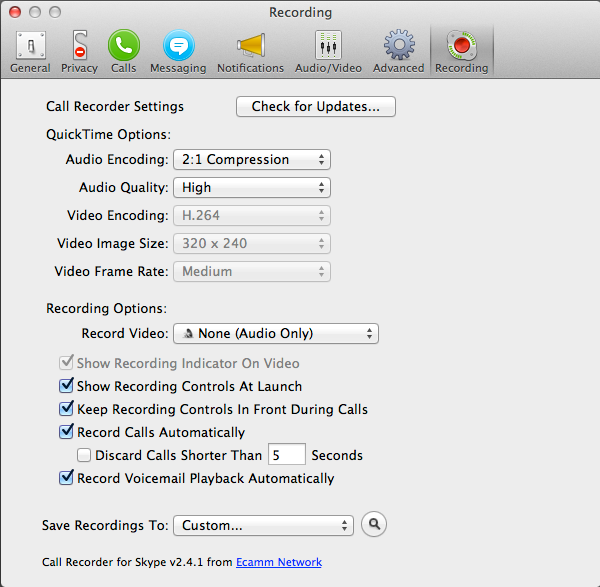
You’ll see that “Call Recorder Settings” is integrated into Skype Preferences via the red “Recording” button on the toolbar. (See the screen shot below.)
You’ll see that “Call Recorder Settings” is integrated into Skype Preferences via the red “Recording” button on the toolbar. (See the screen shot below.)
Content
Although you may be satisfied with most of the default settings, there are a few that you’ll want to check. For example, there are several “Recording Options” that range from recording audio only to recording video on a split screen.
Although you may be satisfied with most of the default settings, there are a few that you’ll want to check. For example, there are several “Recording Options” that range from recording audio only to recording video on a split screen.
Content
Don’t miss the checkboxes indicating whether you want to show the recording controls at launch and the option for displaying the Call Recorder window in the front. The window is so small, it can get lost among other open programs. Finally, be sure to specify where you want the files saved in the “Save Recordings To” drop-down list.
Don’t miss the checkboxes indicating whether you want to show the recording controls at launch and the option for displaying the Call Recorder window in the front. The window is so small, it can get lost among other open programs. Finally, be sure to specify where you want the files saved in the “Save Recordings To” drop-down list.
Content
I’m a podcast addict. I’ve listened to hours and hours of podcasts on all kinds of topics. It was my devotion to this medium that inspired me to start The eLearning Coach podcast for learning professionals. In the process, I’ve come across some great tools that make podcast production easier.
I’m a podcast addict. I’ve listened to hours and hours of podcasts on all kinds of topics. It was my devotion to this medium that inspired me to start The eLearning Coach podcast for learning professionals. In the process, I’ve come across some great tools that make podcast production easier.
Content
Skype recording tools
Skype recording tools
Content
Nearly everyone who is involved in the digital stream seems to have a Skype account, making this approach to interviewing a comfortable experience for both parties. And Call Recorder for Skype, which runs on Mac, is the easiest way I’ve found to record an audio or video interview conducted over Skype. (For the PC, Pamela comes highly recommended.)
Nearly everyone who is involved in the digital stream seems to have a Skype account, making this approach to interviewing a comfortable experience for both parties. And Call Recorder for Skype, which runs on Mac, is the easiest way I’ve found to record an audio or video interview conducted over Skype. (For the PC, Pamela comes highly recommended.)
Content
Call Recorder is an add-on
Call Recorder is an add-on
Content
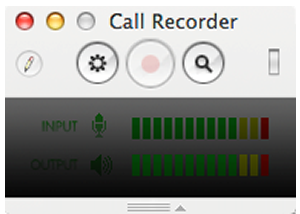
Call Recorder is inexpensive and easy to purchase and download. It’s handy because it’s a Skype add-on, meaning that it’s completely integrated with the software. Once installed, you can set the small Call Recorder window to open every time you launch Skype. To access the settings, click the Gear icon, which you can see below.
Call Recorder is inexpensive and easy to purchase and download. It’s handy because it’s a Skype add-on, meaning that it’s completely integrated with the software. Once installed, you can set the small Call Recorder window to open every time you launch Skype. To access the settings, click the Gear icon, which you can see below.
Content
Some surprises
Some surprises
Content
Call Recorder for Skype comes with a few sweet surprises. The “pencil” icon in the recording window lets you add time markers with annotations during a recording. The software also comes with several utility apps located in a “Movie Tools” folder. There are simple tools for splitting movie and audio tracks and utilities for converting media files to various file formats. Call Recorder saves audio and video files as QuickTime movies.
Call Recorder for Skype comes with a few sweet surprises. The “pencil” icon in the recording window lets you add time markers with annotations during a recording. The software also comes with several utility apps located in a “Movie Tools” folder. There are simple tools for splitting movie and audio tracks and utilities for converting media files to various file formats. Call Recorder saves audio and video files as QuickTime movies.
Content
These days you don’t come across many inexpensive software products that provide exactly what you want—plus a little more. But Call Recorder for Skype is one that does.
These days you don’t come across many inexpensive software products that provide exactly what you want—plus a little more. But Call Recorder for Skype is one that does.