
ATD Blog
Do You Want to Turn Your PowerPoint into a Prezi?
Wed May 13 2015

Content
I cringe when someone tells me, “I want to turn my PowerPoint into a Prezi.”
Content
Why do I feel this way? I love Prezi. It is an exciting and unique way to support your training program with multimedia. Unlike PowerPoint, Prezi doesn’t advance through a series of slides; it is like one giant slide that contains all of your content on a single canvas. Instead of advancing slide by slide, Prezi zooms in on sections of the canvas as the presentation progresses.
Content
The result can be very effective for a learning application. It anchors the learner to the overarching concept, while allowing the trainer to zoom in on the supporting details. The movement gives the illusion of flying over the canvas, zooming and panning over the images and text.
Content
Converting a PowerPoint slideshow into a prezi (that’s what we call a presentation created with Prezi) is like trying to convert a filmstrip into a Hollywood blockbuster. The story line is already there, but all the visuals will need to be reconstructed.
Content
If you add a bunch of PowerPoint slides to the Prezi canvas, you will create a presentation that zooms and flies over a bunch of PowerPoint slides plopped down on the canvas. That’s because PowerPoint is like a deck of cards; you can shuffle them and deal them anyway you like, but the size, shape, and face of the cards never change. Prezi is like a mosaic: you get a different picture depending on how you organize the tiles. Bigger images are made from fitting the smaller pieces together. You can never fully appreciate the complete mosaic until you take a step back and see how all the tiles fit together.
Content
Can you build a prezi from a PowerPoint slide deck? Yes, but it’s going to take some creativity and planning. It takes a different mindset to design a prezi, and PowerPoint users sometimes have difficulty making that transition.
Content
The power of Prezi lies in its capacity to structure content into a visual schematic. This can be a graphical representation like a diagram, or a visual metaphor like a photograph. Your design choices can help your learners form a cognitive map of the material, improving understanding and retention. The content overlays the schematic so it unfolds gradually, like a story. Presenting your content in a PowerPoint slide deck is straightforward, so placing that same content on a three-dimensional canvas is an entirely different matter.
Content
Import Options
Import Options
Content
When a trainer or instructional designer wants to convert a PowerPoint deck into a prezi, I tell them they have two options: quick and dirty, or slow and effective.
Content
Quick and Dirty. In this option, trainers or designers can place their slides onto the Prezi canvas using the built-in PowerPoint Import feature. (Step-by-step instructions are shown below). This will add the iconic Prezi zooming movement into their presentation, but not much else.
Content
Prezi has a few built-in layouts to organize the imported slides, which look like simple graphic organizers. By choosing an appropriate layout, you can visually communicate relationships between the PowerPoint slides. For example, the first slide might be imported into the position of a leaf on the built-in tree layout, while the subsequent slides make up the rest of the tree. Learners experience the content as the frame of reference changes. They don’t realize until the prezi zooms out to a wider view how each leaf is related to the bigger concept of the tree.
Content
At present, there are only a few layouts to choose from, and they may not work for your situation. Importing a slide deck directly into a pre-built layout results in a visually interesting, but uninspired and potentially ineffective prezi.
Content
Slow and Effective. With the second option, you harness the true power of Prezi. Creating an exceptional prezi requires starting from scratch. This means getting out paper and pencil to sketch out how the content is interrelated and how it fits into the overall structure. After you have this graphic representation, lay it onto the Prezi canvas to form the structural foundation.
Content
Individual elements can be positioned into this structure from imported PowerPoint slides. However, because visuals form the backbone of a good prezi, some bullet points will need to be deleted and some images will need to be added.
Content
Step-by-Step Instructions for Importing
Content
Here are a key steps developers need to follow when importing your PowerPoint into Prezi.
Content
Mac users will need to convert their Keynote slide deck into PowerPoint before they can import it to Prezi.
Content
Select “PowerPoint” from Prezi’s Insert menu and choose the file to import.
Content
You’ll see a list of thumbnails in the right sidebar representing the slides. Click the “Insert All” button at the top of the sidebar.
Content
Choose from the available layout diagrams and check “Add a path between your slides.”
Content
When you click the “Insert” button, the diagram will be added to the canvas, with each slide positioned within the structure.
Content
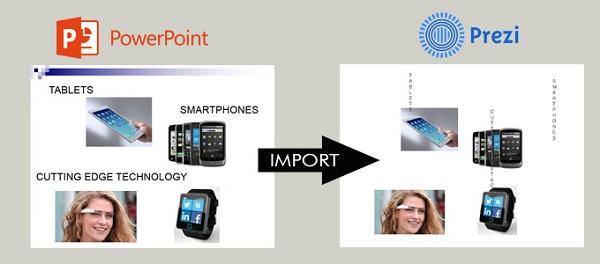
It has been my experience that the Prezi import process provides less than stellar results. It may be easier to insert the original elements directly into Prezi, foregoing the import feature altogether. As you can see in the example, images and titles convert well, but textboxes are often mangled in the conversion.

Content
The import itself is straightforward, but it may not give you the result you expect. So when I hear someone say, “I want to turn my PowerPoint into a Prezi,” I do my best not to cringe. Instead I ask them a simple question: “Why?” If they only want to add movement to their slides, I encourage them to check out Emaze or Sway instead.
Content
But if they want to use Prezi to tell their story visually and use the zoom to represent the relationships between concepts, I give them a big smile. Then I warn them to set aside a few days of intense creativity and planning. It only takes a couple of minutes to import a PowerPoint file, but what you do with those imported slides will determine the quality and effectiveness of your presentation.