
ATD Blog
How to Storyboard Your Next Video
Wed Nov 06 2019

Brought to you by
Content
A storyboard is your road map when you make a video.
A storyboard is your road map when you make a video.
Content
Like a script, your storyboard visually guides you throughout the production process. By planning your video, you know which shots you need to create and how to create them when filming begins. You can get others’ feedback early on and make simple adjustments to your storyboard rather than making major changes while filming.
Like a script, your storyboard visually guides you throughout the production process. By planning your video, you know which shots you need to create and how to create them when filming begins. You can get others’ feedback early on and make simple adjustments to your storyboard rather than making major changes while filming.
Content
To make a good storyboard, you don’t need to be a visual artist (though you can be). A storyboard can be anything from comic book–like rough sketches to stick figures to computer-generated drawings. To help you plan your video, we’ll walk through the basics of creating storyboards, including:
To make a good storyboard, you don’t need to be a visual artist (though you can be). A storyboard can be anything from comic book–like rough sketches to stick figures to computer-generated drawings. To help you plan your video, we’ll walk through the basics of creating storyboards, including:
Content
the basic elements of every storyboard
the basic elements of every storyboard
Content
a breakdown of two popular storyboarding methods.
a breakdown of two popular storyboarding methods.
Content
Understanding different ways to storyboard will allow you to visually plan your video. Regardless of your budget or design experience, you’ll be able to create a clear map that seamlessly guides you through production.
Understanding different ways to storyboard will allow you to visually plan your video. Regardless of your budget or design experience, you’ll be able to create a clear map that seamlessly guides you through production.
Your Go-to Storyboard Checklist
Content
Whether they’re drawn by a storyboard artist or diagrammed on a computer, all storyboards share the same information. They need to touch on the main actions, speech, and effects in every shot to clearly communicate how a video will appear.
Whether they’re drawn by a storyboard artist or diagrammed on a computer, all storyboards share the same information. They need to touch on the main actions, speech, and effects in every shot to clearly communicate how a video will appear.
Content
Here are the key elements that every storyboard should include:
Here are the key elements that every storyboard should include:
Content
Shot Images : Individual panels featuring 2-D drawings to show what’s happening—actions, characters—throughout a video
Shot Images: Individual panels featuring 2-D drawings to show what’s happening—actions, characters—throughout a video
Content
Shot Number : The number indicating when a shot appears according to a video’s shot list
Shot Number: The number indicating when a shot appears according to a video’s shot list
Content
Action : The primary activity happening in a shot
Action: The primary activity happening in a shot
Content
Dialogue (Or Narration) : Any speech that is heard throughout a video
Dialogue (Or Narration): Any speech that is heard throughout a video
Content
FX : Technical details that explain how the shot is created in production and post-production (for instance, aspect ratio, camera angles, camera movement, shot type, sound effects, special effects)
FX: Technical details that explain how the shot is created in production and post-production (for instance, aspect ratio, camera angles, camera movement, shot type, sound effects, special effects)
Content
A full storyboard has all the information necessary to imagine how your finished video will appear. Reviewing your images and notes for each shot, you and your team can brainstorm how your video should be adjusted and what resources you will need in production.
A full storyboard has all the information necessary to imagine how your finished video will appear. Reviewing your images and notes for each shot, you and your team can brainstorm how your video should be adjusted and what resources you will need in production.
Content
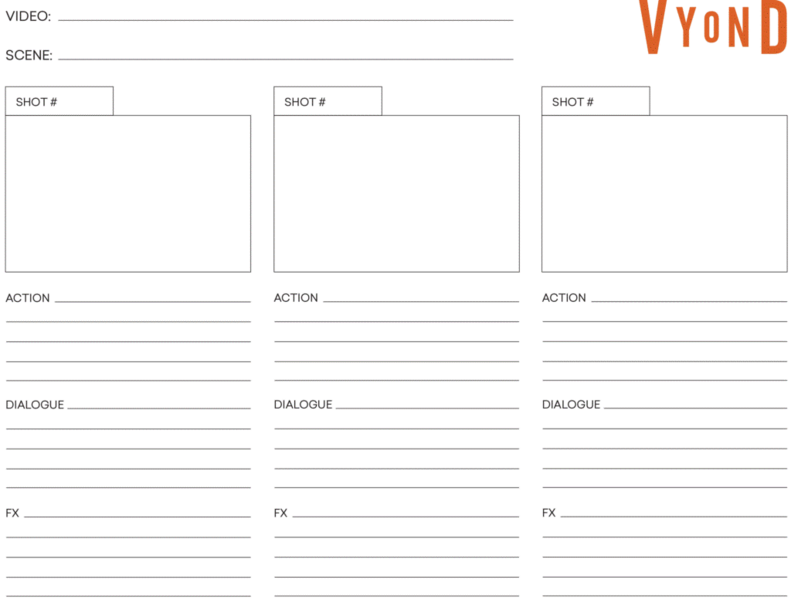
Here’s an example of a blank storyboard:
Here’s an example of a blank storyboard:
Content
Download this: US Letter | A4
Two Popular Storyboarding Methods to Consider
Content
When most people hear the word “storyboard,” they think of a professional animator quickly sketching out a cartoon feature film.
When most people hear the word “storyboard,” they think of a professional animator quickly sketching out a cartoon feature film.
Content
As it turns out, a storyboard doesn’t have to be a work of art—it doesn’t even have to be hand-drawn. With video production software, there are options for all types of users—regardless of their industry, design experience, or budget—to create useful professional-grade storyboards.
As it turns out, a storyboard doesn’t have to be a work of art—it doesn’t even have to be hand-drawn. With video production software, there are options for all types of users—regardless of their industry, design experience, or budget—to create useful professional-grade storyboards.
Content
Hand-Drawn Storyboards
Hand-Drawn Storyboards
Content
The classic storyboarding process is drawing by hand. You sketch a mock-up of what each shot will look like.
The classic storyboarding process is drawing by hand. You sketch a mock-up of what each shot will look like.
Content
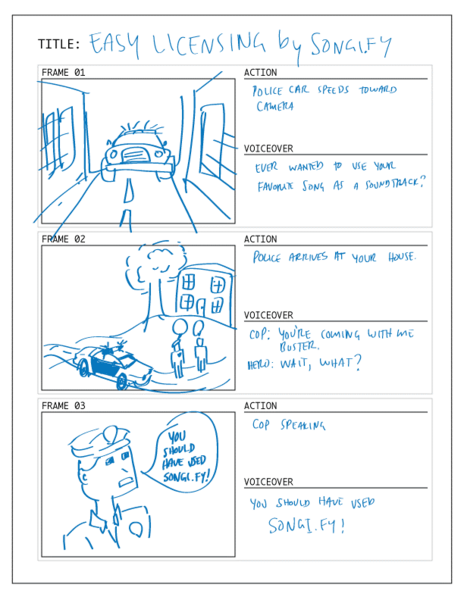
As mentioned, you don’t need to be a great artist to create a storyboard; stick figures are enough. The principal goal is to convey the main action that is happening in the shot, so each frame doesn’t need to be detailed.
As mentioned, you don’t need to be a great artist to create a storyboard; stick figures are enough. The principal goal is to convey the main action that is happening in the shot, so each frame doesn’t need to be detailed.
Content
A longhand storyboard cuts costs, but it’s not necessarily the most efficient option, as seen in these pros and cons:
A longhand storyboard cuts costs, but it’s not necessarily the most efficient option, as seen in these pros and cons:
Content
Pro : It’s free. All you need is a pencil and paper to create a hand-drawn storyboard.
Pro: It’s free. All you need is a pencil and paper to create a hand-drawn storyboard.
Content
Con : It’s time-consuming. Drawing every single shot—even if they’re not detailed—will take a while considering that one storyboard frame only represents six seconds of a video. For a three-minute video, for example, you would need 30 storyboard frames. There is also a risk of losing your storyboard since your work is tied to a piece of paper.
Con: It’s time-consuming. Drawing every single shot—even if they’re not detailed—will take a while considering that one storyboard frame only represents six seconds of a video. For a three-minute video, for example, you would need 30 storyboard frames. There is also a risk of losing your storyboard since your work is tied to a piece of paper.
Content
If you hope to keep video costs low, a hand-drawn storyboard is probably the best method for you. Just keep in mind that you will need to devote at least a few hours to complete the task, and you’ll need to scan or make copies of your storyboard for everyone working on your video.
If you hope to keep video costs low, a hand-drawn storyboard is probably the best method for you. Just keep in mind that you will need to devote at least a few hours to complete the task, and you’ll need to scan or make copies of your storyboard for everyone working on your video.
Content
Storyboarding Software
Storyboarding Software
Content
People with less time to hand-draw frames or with larger budgets may opt to use specialized storyboarding software. These programs are built with robust customization and automation features to help you quickly create your storyboards.
People with less time to hand-draw frames or with larger budgets may opt to use specialized storyboarding software. These programs are built with robust customization and automation features to help you quickly create your storyboards.
Content
With any of these storyboarding tools, there are a few pros and cons to consider.
With any of these storyboarding tools, there are a few pros and cons to consider.
Content
Pros : You can create a high-quality storyboard in minimal time. These tools allow you to create highly detailed frames with custom aspect ratios, image uploading, and more with the click of your mouse.
Pros: You can create a high-quality storyboard in minimal time. These tools allow you to create highly detailed frames with custom aspect ratios, image uploading, and more with the click of your mouse.
Content
Cons : Some programs can be costly and somewhat inconvenient. In most cases, you will need to switch to a separate software, outside of video editing, to create your storyboard.
Cons: Some programs can be costly and somewhat inconvenient. In most cases, you will need to switch to a separate software, outside of video editing, to create your storyboard.
Content
While these storyboarding tools are powerful, many organizations don’t need these features to create their storyboards. Only companies with elaborate videos and full production teams need to create these hyper-detailed storyboards with specialized software.
While these storyboarding tools are powerful, many organizations don’t need these features to create their storyboards. Only companies with elaborate videos and full production teams need to create these hyper-detailed storyboards with specialized software.
Build Your Own Storyboard Today
Content
A storyboard is a critical part of the pre-production process. This planning minimizes production roadblocks by allowing you and your team members to refine your video vision before filming even begins.
A storyboard is a critical part of the pre-production process. This planning minimizes production roadblocks by allowing you and your team members to refine your video vision before filming even begins.
Content
To learn how to explain complex ideas with animation and videos, join me at ATD TechKnowledge 2020 .
To learn how to explain complex ideas with animation and videos, join me at ATD TechKnowledge 2020.