
ATD Blog
Pinterest for L&D
Mon Dec 16 2013
Content
One of the unique products to emerge in an increasingly crowded field of social tools is Pinterest, a fun combination of social bookmarking, images, commenting, and public sharing. It’s a great place for connecting with and sharing resources for your own professional development.
One of the unique products to emerge in an increasingly crowded field of social tools is Pinterest, a fun combination of social bookmarking, images, commenting, and public sharing. It’s a great place for connecting with and sharing resources for your own professional development.
Content
But that doesn’t mean everyone is ready—or knows how—to use Pinterest. Here is some help.
But that doesn’t mean everyone is ready—or knows how—to use Pinterest. Here is some help.
Content
Lead them to water
Lead them to water
Content
I’ve been dealing with introducing new techs and tools for a long time now. The best way I’ve found of encouraging acceptance and use is introducing a tool at the moment it will solve someone’s problem. A lot there depends on serendipity and hearing opportunity when it knocks. And one of the easiest ways to teach people to use (and like) a tool is to give them something fun to do with it.
I’ve been dealing with introducing new techs and tools for a long time now. The best way I’ve found of encouraging acceptance and use is introducing a tool at the moment it will solve someone’s problem. A lot there depends on serendipity and hearing opportunity when it knocks. And one of the easiest ways to teach people to use (and like) a tool is to give them something fun to do with it.
Content
I’ve tricked (er, I mean led) lots of people to Pinterest by asking them to share photos of their favorite holiday decorations (even better if they tell a short story with it). We’ve even developed a few Pinterest traditions, including the fabulous annual collaborative Ultimate Holiday Gift Guide .
I’ve tricked (er, I mean led) lots of people to Pinterest by asking them to share photos of their favorite holiday decorations (even better if they tell a short story with it). We’ve even developed a few Pinterest traditions, including the fabulous annual collaborative Ultimate Holiday Gift Guide .
Content
I hadn’t intended to do it this year, but demand from people on Twitter I don’t even know prompted me to again host the Thanksgiving Gallery of Hand Turkeys . Some 42 people contributed, from age 5 up, individually and as families, and some from other countries where they don’t even celebrate Thanksgiving.
I hadn’t intended to do it this year, but demand from people on Twitter I don’t even know prompted me to again host the Thanksgiving Gallery of Hand Turkeys. Some 42 people contributed, from age 5 up, individually and as families, and some from other countries where they don’t even celebrate Thanksgiving.
Content
Is it silly? Sure. But it builds connection and community, and it is fun. More important, it helps people understand and use the tool. And when I ask some of them later to find and share an image they’d include on a virtual tour of their workplace, well, they’ll already know how to do that.
Is it silly? Sure. But it builds connection and community, and it is fun. More important, it helps people understand and use the tool. And when I ask some of them later to find and share an image they’d include on a virtual tour of their workplace, well, they’ll already know how to do that.
Content
Now, here are some ideas for L&D practitioners looking for ways to incorporate Pinterest into practice.
Now, here are some ideas for L&D practitioners looking for ways to incorporate Pinterest into practice.
Content
Collaborative bookmarking
Collaborative bookmarking
Content
Check out this collaborative board from Tracy Parish . She invited industry friends to pin their suggestions for good books about instructional design. Most include a comment from the pinner about why they chose it, and link directly to Amazon so they can be purchased. Note the number of comments, including some from authors of the books pinned.
Check out this collaborative board from Tracy Parish. She invited industry friends to pin their suggestions for good books about instructional design. Most include a comment from the pinner about why they chose it, and link directly to Amazon so they can be purchased. Note the number of comments, including some from authors of the books pinned.
Content
Building a narrative/backchannel learning
Building a narrative/backchannel learning
Content
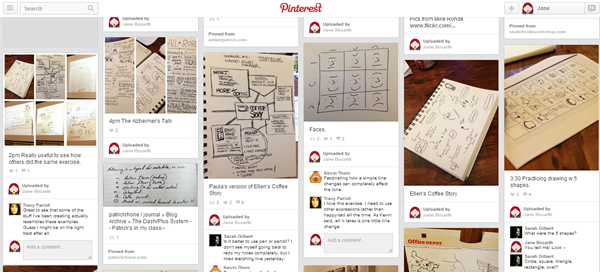
I recently attended the pilot of Mike Rohde’s new Sketchnote Workshop. While I tweeted it, as usual, I realized the visual nature of it might be better suited to Pinterest.
I recently attended the pilot of Mike Rohde’s new Sketchnote Workshop. While I tweeted it, as usual, I realized the visual nature of it might be better suited to Pinterest.
Content
I began documenting my day and uploading photos and comments as we switched activities or shared what we were doing. It built a nice narrative of the day and offered a place for quick conversation. This also supported backchannel learning for colleagues who were unable to attend the workshop.
I began documenting my day and uploading photos and comments as we switched activities or shared what we were doing. It built a nice narrative of the day and offered a place for quick conversation. This also supported backchannel learning for colleagues who were unable to attend the workshop.
Content
A friend, intrigued by the tweets, visited the Pinterest board and ended up sketchnoting the meeting she was in that day. She’s now bringing Mike in to deliver the workshop for the Atlanta ASTD chapter (February 11: check back on the chapter’s event page for details coming soon).
A friend, intrigued by the tweets, visited the Pinterest board and ended up sketchnoting the meeting she was in that day. She’s now bringing Mike in to deliver the workshop for the Atlanta ASTD chapter (February 11: check back on the chapter’s event page for details coming soon).
Content
Board: My Day at Mike Rohde’s Pilot of His New Sketchnote Workshop
Board: My Day at Mike Rohde’s Pilot of His New Sketchnote Workshop
Content
Virtual field trips
Virtual field trips
Content
Offer tours of facilities to new hires; tours of your training center to first-time visitors; tours of a conference site. You can use these for recruiting to show potential hires how the workplace looks, such as pictures of areas where defibrillators are installed. You might include pictures of company extras; a friend who’s worked at a local big company for years didn’t know there was a meditation garden until I posted a photo of it.
Offer tours of facilities to new hires; tours of your training center to first-time visitors; tours of a conference site. You can use these for recruiting to show potential hires how the workplace looks, such as pictures of areas where defibrillators are installed. You might include pictures of company extras; a friend who’s worked at a local big company for years didn’t know there was a meditation garden until I posted a photo of it.
Content
Overview of topic or area of interest and handout replacement
Overview of topic or area of interest and handout replacement
Content
Although I’ve been offering it in webinar format for years, my “Tips for the Positive Deviant” session suddenly caught fire last May. There was so much interest in it I finally set up a Pinterest board with highlights and key points from the session, additional resources with links for easy access, and a link to the ASTD webinar recording. This also serves as a much more robust takeaway than a copy of my slides or other usual event handout.
Although I’ve been offering it in webinar format for years, my “Tips for the Positive Deviant” session suddenly caught fire last May. There was so much interest in it I finally set up a Pinterest board with highlights and key points from the session, additional resources with links for easy access, and a link to the ASTD webinar recording. This also serves as a much more robust takeaway than a copy of my slides or other usual event handout.
Content
Prework or snapshot of planned conversation
Prework or snapshot of planned conversation
Content
As one of the moderators of the weekly Twitter-based #lrnchat sessions, I often see the problem of having a chat catch someone’s eye after it’s underway. They want to join in, but they are coming into the conversation late, sometimes to a topic that’s a bit esoteric. Or—and I’m guilty too—they didn’t read an article we suggested for prereading.
As one of the moderators of the weekly Twitter-based #lrnchat sessions, I often see the problem of having a chat catch someone’s eye after it’s underway. They want to join in, but they are coming into the conversation late, sometimes to a topic that’s a bit esoteric. Or—and I’m guilty too—they didn’t read an article we suggested for prereading.
Content
So, we’ve started using a Pinterest board to support some of these chats. Participants can check in quickly and get an overview of the topic—just the gist of it, sometimes, but enough to help them participate more fully. Here’s one we created to support a #lrnchat conversation focused on our own beliefs and metaphors about learning and teaching, and what those beliefs mean to one’s practice.
So, we’ve started using a Pinterest board to support some of these chats. Participants can check in quickly and get an overview of the topic—just the gist of it, sometimes, but enough to help them participate more fully. Here’s one we created to support a #lrnchat conversation focused on our own beliefs and metaphors about learning and teaching, and what those beliefs mean to one’s practice.
Content
Course resources and support
Course resources and support
Content
Assistant Professor Steven Bickmore uses Pinterests boards to create reading lists for each of his courses. They’re easy to update, more enticing than a list of typed titles, and available for the rest of us to peruse.
Assistant Professor Steven Bickmore uses Pinterests boards to create reading lists for each of his courses. They’re easy to update, more enticing than a list of typed titles, and available for the rest of us to peruse.
Content
Encouraging reflection
Encouraging reflection
Content
I’ve reused the “metaphor” board described above as a reflective activity for students in instructional design and train-the-trainer sessions. They are asked to review it and then provide a verbal or written description of their own metaphors and how they are borne out in their own practice.
I’ve reused the “metaphor” board described above as a reflective activity for students in instructional design and train-the-trainer sessions. They are asked to review it and then provide a verbal or written description of their own metaphors and how they are borne out in their own practice.
Content
Job aids
Job aids
Content
While I prefer Snapguide for preparing job aids these days, you could easily build a guide in Pinterest. Be sure to add images in reverse order. As comments can alter layout and size, you might want to number them, too. Post pictures of equipment repairs and workarounds. And remember: You don’t have to be the one doing all the pinning.
While I prefer Snapguide for preparing job aids these days, you could easily build a guide in Pinterest. Be sure to add images in reverse order. As comments can alter layout and size, you might want to number them, too. Post pictures of equipment repairs and workarounds. And remember: You don’t have to be the one doing all the pinning.
Content
Collaborative class activities
Collaborative class activities
Content
Here are some ideas:
Here are some ideas:
Content
Invite pinners to share images of customer service issues (like stained carpets and water cooler with no cups).
Invite pinners to share images of customer service issues (like stained carpets and water cooler with no cups).
Content
Have a conversation about corporate culture based on pinned images of company furnishings and signage.
Have a conversation about corporate culture based on pinned images of company furnishings and signage.
Content
Post pictures of the different ways a classroom can be set up, and ask participants in a train-the-trainer course to describe how each setup might affect interaction and social activities.
Post pictures of the different ways a classroom can be set up, and ask participants in a train-the-trainer course to describe how each setup might affect interaction and social activities.
Content
Have learners share images of final projects.
Have learners share images of final projects.
Content
Did you have groups discuss an issue and create a flip chart report? Post pictures of the charts.
Did you have groups discuss an issue and create a flip chart report? Post pictures of the charts.
Content
Host a Pinterest Appy Hour: Invite pinners to share their favorite new app from the past year; their favorite productivity app; their favorite photography app, their favorite app for travel, and so on.
Host a Pinterest Appy Hour: Invite pinners to share their favorite new app from the past year; their favorite productivity app; their favorite photography app, their favorite app for travel, and so on.
Content
Have learners create a class book recapping activities and takeaways.
Have learners create a class book recapping activities and takeaways.
Content
Reaching other learners
Reaching other learners
Content
One of my historical concerns about many social tools is that so many of them are heavily text-based: blogs, microblogs, text chats, and so forth. In my world this can marginalize those with low-literacy skills or those with English as a second language. We’re in a world in which the vast majority of our workforces own some kind of mobile phone or device—most of them with cameras. The potential for user-generated images to support and include these workers is tremendous.
One of my historical concerns about many social tools is that so many of them are heavily text-based: blogs, microblogs, text chats, and so forth. In my world this can marginalize those with low-literacy skills or those with English as a second language. We’re in a world in which the vast majority of our workforces own some kind of mobile phone or device—most of them with cameras. The potential for user-generated images to support and include these workers is tremendous.
Content
Logistical tips and advice for using Pinterest
Logistical tips and advice for using Pinterest
Content
Here’s how Pinterest works:
Here’s how Pinterest works:
Content
Pinterest is free. It is available on desktop or via a free mobile app.
Pinterest is free. It is available on desktop or via a free mobile app.
Content
Pinterest allows you to pin images from a website and, from other Pinterest boards. You can also pin by uploading images from your own computer or mobile device.
Pinterest allows you to pin images from a website and, from other Pinterest boards. You can also pin by uploading images from your own computer or mobile device.
Content
Pinterest boards are public to view; anyone can see them without an account.
Pinterest boards are public to view; anyone can see them without an account.
Content
In order to create boards and pin to them, you need your own account.
In order to create boards and pin to them, you need your own account.
Content
At this time, Pinterest doesn’t allow for moving pins around a board. To build a chronology—like a story from start to finish—you need to upload in order you want them to be viewed.
At this time, Pinterest doesn’t allow for moving pins around a board. To build a chronology—like a story from start to finish—you need to upload in order you want them to be viewed.
Content
You can set up “secret” boards to work on until you are ready to publish them. At this time only the board owner can work with the secret boards; they can’t be shared with other pinners.
You can set up “secret” boards to work on until you are ready to publish them. At this time only the board owner can work with the secret boards; they can’t be shared with other pinners.
Content
You need to issue invitations to other pinners. While some complain that Pinterest doesn’t offer users public boards on which everyone can pin, it also means that spammers can’t just pin on any board. It makes it a bit safer for those concerned about material inappropriate for some audiences.
You need to issue invitations to other pinners. While some complain that Pinterest doesn’t offer users public boards on which everyone can pin, it also means that spammers can’t just pin on any board. It makes it a bit safer for those concerned about material inappropriate for some audiences.
Content
Sometimes for the sake of speed or including people who for whatever reason don’t have or want a Pinterest account, I just ask people to send me images and I upload them myself.
Sometimes for the sake of speed or including people who for whatever reason don’t have or want a Pinterest account, I just ask people to send me images and I upload them myself.
Content